
Phone: 352
688 8160 M-F EST
Prowler Stainless Steel Dash A/C Cover Plate©
PART# ACC-821013
INSTALLATION INSTRUCTIONS
Included: 1 x Dash A/C Cover Plate, 1 x promoter packet, 1 x Tape Test Kit
1.
Take your Cover Plate out of the wrapper. Do not remove the back red
tape covering. Just hold it up to your dash panel to see how it
will fit when mounted.
2.
Wash you’re A/C control panel on your dash with Rubbing Alcohol
vigorously. This
will remove the oil on the surface. Be sure to clean every nook and
cranny around the area so that your Cover Plate can get a good adhesive
grip.
3. To test adhesion of the
dash surface -
take a piece of tape from your test tape (included) or a piece of
masking tape and try sticking it to the area on the dash where you will
be mounting your trim plate. Try several areas. If the
test tape sticks in each area you try then go to the next step. If
it does not then re-clean until it does.
4.
Take Cover Plate and put it up to you’re a/C control panel. Position it
as you want to permanently mount it. Once you are comfortable with
exactly how it will fit you may take the red backing off the back side
exposing the sticky tape.
5.
Take your promoter packet and wipe the entire area where your Cover
Plate is going to attach.
6. Very carefully re-position the Cover Plate in place without touching it against the Dash A/C control panel. Once you are certain that is where you want it - lightly set it against the A/C control panel on your dash. Make any final tiny adjustments. Once this is done, press on the Cover Plate firmly. With your fingers press all around the surface of the Cover Plate to ensure it is sticking everywhere it touches the dash.
7.
You may even want to stick pieces of masking tape over the Cover Plate
attaching it tightly to the dash A/C control panel. Leave it overnight
for a tight fit. Then remove the masking tape. Clean the area with
rubbing alcohol.
TheProwlerStore.com is a Hot Car Accessories, Inc. site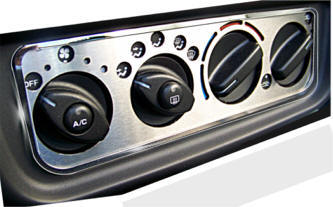
Questions? Please contact:
admin@TheProwlerStore.com
Copyright 2005 - 2024
Not affiliated with
Chrysler Corporation
or it's divisions.


